/Phin%20Logo%20Stacked.png?width=60&height=60&name=Phin%20Logo%20Stacked.png)
In the Pax8 Marketplace:
- Click into the Catalog
- Search for Phin in the Catalog
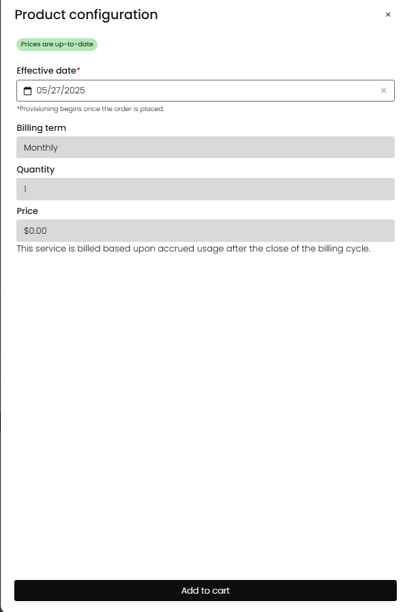
- Order Phin for the MSP (Phin is a Partner Only Product that Pax8 will bill in arrears based on usage; therefore, you need to order this SKU once, for the MSP. You will not be able to order it for a Company)
- Go through the checkout wizard
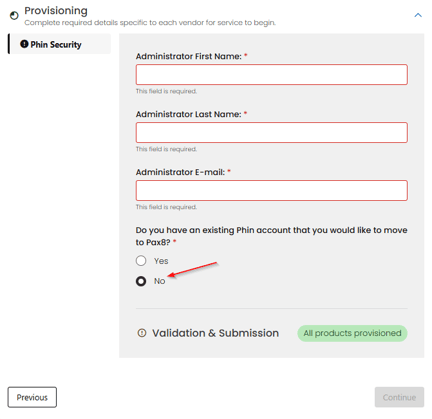
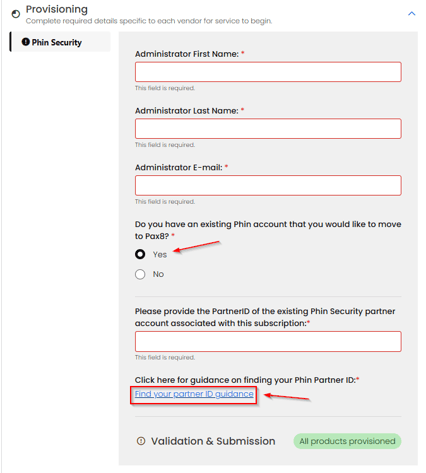
- On the second-to-last step of Checkout, you will have the option to select "Yes" or "No" to having an existing Phin account. If you select "No," our team will create a new MSP dashboard for them. If you select "Yes," they will need their Phin Partner ID. Follow these directions to find your Partner ID
Existing Phin Partner:
Viola! You can now acquire Phin through Pax8! The Phin team will always be here to help you with onboarding or answer any of your technical questions, too!