/Phin%20Logo%20Stacked.png?width=60&height=60&name=Phin%20Logo%20Stacked.png)
In order to reset partner-level admins, log into the Phin Security portal and select the Partner Home section from the main navigation menu.
Scroll to the Administrators section and locate the user account needing an MFA reset from the table list or search bar.
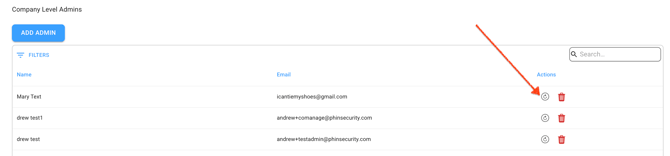
Navigate to the Actions column on the far right of the user's row and click the Reset MFA icon (the circular clock icon located between the blue edit pencil and the red trash bin).
.png?width=670&height=366&name=Phin%20Security%20(14.09.2026%2008_53).png)
Scroll to the Administrators section and locate the user account needing an MFA reset from the table list or search bar.
Navigate to the Actions column on the far right of the user's row and click the Reset MFA icon (the circular clock icon located between the blue edit pencil and the red trash bin).
You can also reset MFA for company-level admins. Select the company the co-admin is associated with, select users, and click on the reset MFA icon as shown below.