Google DMI is here - along with a number of small changes, improvements and bug fixes to wrap up the end of the year
Google DMI
Google DMI (direct message injection) allows Phin to directly inject messages into Google Workspace inboxes, similar to how our Microsoft DMI integration works. This allows messages to bypass traditional firewalls and spam filters that would otherwise require manual allowlisting.
Head to our dedicated knowledge base article to read more about it and follow the setup guide.
Phishing Clicks & Reporting Updates
The phishing csv that can be generated ad-hoc or included as part of monthly/weekly reports to stakeholders has been updated to make the headers more accessible. Think 'Date Clicked' instead of dateClicked. We also added the following to the csv file.- A 'Reported' true/false column on files generated from company tenants that have the Report Phishing Button integration turned on.
- A 'Category' column that includes which phishing category an email template was sourced from within a campaign.
Also, if you missed it from our previous set of release notes, the performance reports no longer show a 'Reported Phishes' metric for the companies that don't have the Report Phishing Button integration enabled.
Microsoft DMI
The 'Graph API Mail Delivery' integration is now called the 'Microsoft DMI' integration. Nothing has changed about the functionality of this integration, we just thought it was time to give it a more appropriate name rather than just naming the technology it used to perform the direct message injection in Outlook inboxes. If you are unfamiliar with this integration you can read more about it here.
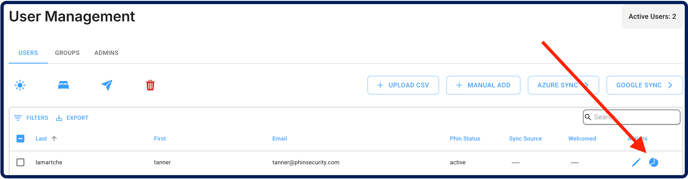
Access User Analytics from User Management Page
Now a user's analytics page is accessible with the click of a button from the 'Actions' column on the 'User Management' page. No more digging through the analytics pages themselves to look at a particular users analytics history.