/Phin%20Logo%20Stacked.png?width=60&height=60&name=Phin%20Logo%20Stacked.png)
Edit Users via Public API
You can now edit a single user or users in bulk via the public api. Refer to the following articles for details on each use case.
Find courses faster in Training Analytics
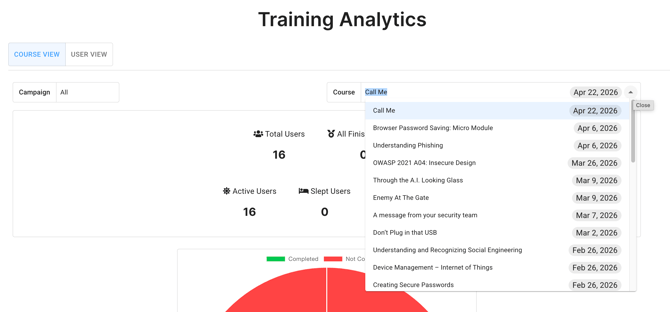
The course dropdown in Training Analytics now defaults to assigned date with the most recent course at the top, and each entry is tagged with its assignment date. Additionally on the left, you can filter by campaign.
Custom Course Assessments for Shared Campaigns
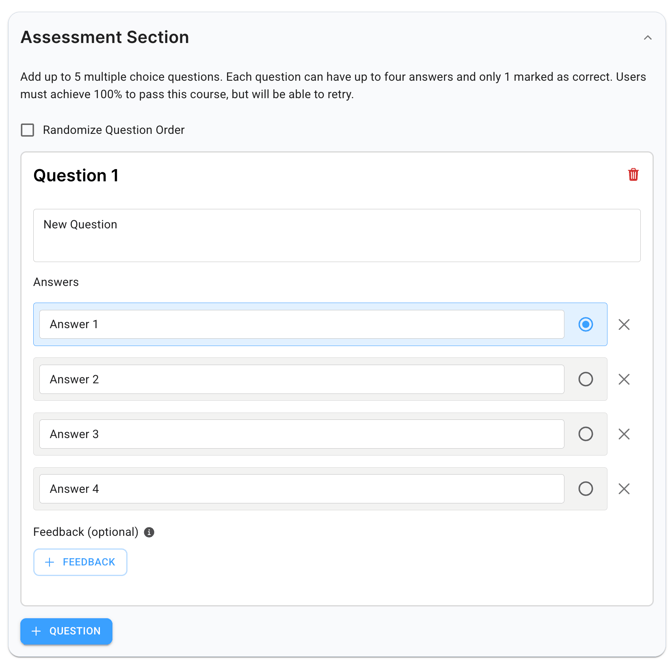
You can now build your own assessments within the Phin Content Library at the partner level when creating a custom course. This is Shared Campaign compatible only. Assessments can include up to 5 questions, 4 answers per question with only 1 correct answer per question, and an optional feedback field for incorrect selections.
Learn more about custom assessments here.
Download Shared Campaign Metrics
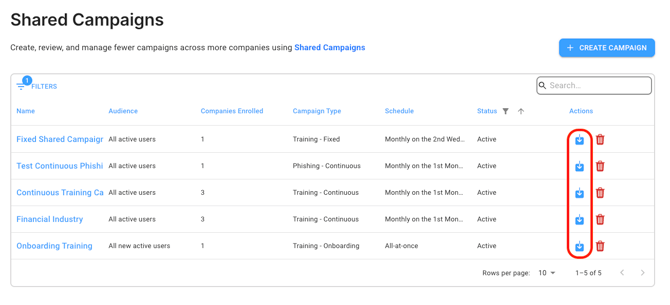
Now the metrics associated with each company in a shared campaign can be downloaded in CSV format from the shared campaign dashboard. Here's what can be exported as of this release.
-
Companies enrolled
-
Date of enrollment per company
-
# of enrolled users per company
-
Completion rates per company
- Completion rates per assigned course
Let us know what other data you'd like to be able to export and why on our shared campaigns feedback board.
Knowledge Base
Read more about previous updates on the release notes page.
Thanks for using our product 😀
The Product Team @ Phin