If your dark web monitoring tool tells you an employee's credentials have been found on the dark web, step one is to not panic. Seriously.

An alert like this doesn't necessarily mean an attacker has already logged into the account or that your client's network has been compromised. What it does mean is that the risk has just increased significantly, and the clock has started ticking.
Millions of stolen credentials are bought, sold and shared on criminal marketplaces every year. Once an employee's business email address and password become available, attackers can begin trying them against Microsoft 365, VPNs, remote desktop services and countless other business applications. If that password has been reused (we did warn you) or multi-factor authentication (MFA) isn't enabled, a simple data breach elsewhere can quickly become your client's security incident.
That's why dark web monitoring for business is so valuable. Instead of discovering there's a problem after an account has already been compromised, it gives MSPs an early warning so they can act before attackers do. Like a smoke alarm, you'd much rather hear an annoying beep than explain to your client why their life’s work has been burnt to the ground.
How Do Employee Credentials End Up on the Dark Web?
Before jumping into the response plan, it helps to understand how credentials end up on the dark web in the first place. The three most common causes:
- Third-party data breaches
- Password reuse
- Infostealer Malware
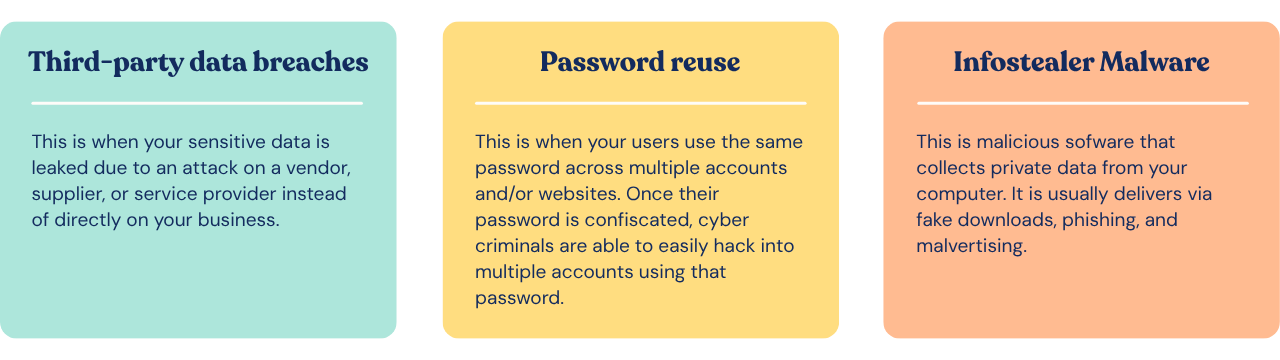 In each case, attackers obtain usernames and passwords before selling or sharing them on criminal marketplaces.
Password reuse is what turns an inconvenience into a serious business risk. If an employee uses the same password for a shopping website and Microsoft 365, attackers don't need sophisticated hacking techniques. They simply try the stolen credentials against business systems until something works, a tactic known as credential stuffing.
Infostealer malware makes the problem even worse by stealing passwords, browser cookies and session tokens directly from infected devices. The important thing to remember is that credential exposure isn't necessarily the employee's fault. What matters is how quickly you respond once you know about it.
How Do You Know Credentials Have Been Exposed?
Without dark web monitoring, you usually don't know credentials have been exposed until an attacker tries using them or you get a letter in the mail about a data breach that may or may not have included your credentials. Dark web monitoring continuously searches known breach databases and underground sources for your clients' business email addresses and credentials, alerting you as soon as a match is found so you can investigate before attackers have the chance to exploit the exposure.
The alternative would involve manually browsing criminal marketplaces, which is both spectacularly inefficient and likely to raise a few questions during your next performance review. (So, please don’t do that.)
You've Received the Alert. Now What?
Receiving an alert doesn't automatically mean you're dealing with a full-blown security incident. Treat it as an opportunity to reduce the risk before it becomes one.
Step 1: Reset the Password Immediately
I know we said step one was not to panic, but that’s not really doing anything, so let’s call that step zero. Your first priority should then be changing the exposed password.
Even if there's no evidence the account has been accessed, you should assume the password is no longer trustworthy. Generate a new, unique password that hasn't been used previously and encourage the employee to store it in a reputable password manager rather than trying to memorize it.
It's also worth asking whether they've reused that password anywhere else. If they have, those accounts should be updated too. A compromised Netflix password might not sound like an IT problem until you discover it's also protecting the company's finance system.
Password reuse is a bit like using the same key for your house, your office, your car and your safe - convenient until someone else gets hold of it.
Step 2: Review Multi-Factor Authentication
Next, review the account's MFA configuration. If MFA isn't enabled, now is the perfect time to fix that. If it is, verify that no unexpected authentication methods, recovery options, or devices have been added. Strong, phishing-resistant MFA won't stop every attack, but it remains one of the most effective defenses against stolen passwords.
Step 3: Look for Signs of Account Compromise
Now it's time to investigate - grab your magnifying glass and your clay pipe.
Review recent login history, authentication logs and any security alerts associated with the account. Look for unfamiliar locations, impossible travel events, unusual login times or repeated failed login attempts.
If you're investigating Microsoft 365, check for newly created inbox rules, suspicious forwarding addresses and unexpected changes to account settings. Attackers often establish persistence long before anyone notices they've gained access.
At this stage, you're trying to answer one simple question: are you looking at exposed credentials, or evidence of an active compromise?
Step 4: Assess the Risk
Once you've secured the account, consider what the employee actually had access to.
Not every exposed account carries the same level of risk, so prioritize your investigation based on what the user can access.
- Business email accounts: Can be used for business email compromise, internal phishing and password resets.
- Microsoft 365: May provide access to email, SharePoint, Teams, OneDrive and sensitive company data.
- VPN or remote access: Could give attackers direct access to the corporate network.
- Administrative accounts: Should always receive the highest priority because they can be used to disable security controls, create new accounts and move laterally through the environment.
Decide Whether You Need Incident Response

Sometimes you'll complete your investigation and conclude that the credentials were exposed but never used. That's the best-case scenario.
Other times, you'll find suspicious logins, mailbox changes or evidence that someone has already accessed the account. At that point, you're no longer responding to credential exposure. You're responding to an active security incident.
Depending on what you discover, your next steps may include revoking active sessions, resetting additional accounts, investigating affected endpoints, notifying stakeholders or activating your client's incident response plan.
The earlier you identify suspicious activity, the easier it is to contain. That's one of the biggest advantages of dark web monitoring for business. It gives you time, and in cybersecurity, time is often the difference between a password reset and a ransomware recovery.
Preventing It from Happening Again
No security control can stop every third-party data breach, but several can dramatically reduce the chances of exposed credentials leading to compromise.
Preventing future exposure comes down to layered security. Regular cybersecurity awareness training and phishing simulations help employees recognize and report threats before credentials are stolen, while MFA and password managers reduce the likelihood that exposed credentials can actually be used. Finally, continuous dark web monitoring provides the early warning MSPs need to respond before attackers do.
Don't overlook cyber insurance requirements. Many insurers now expect businesses to demonstrate controls such as MFA, security awareness training and documented security processes before they'll pay out following an incident. Good security doesn't just reduce risk. It can also help ensure you're covered when something does go wrong.
Cyber insurers have become a little like strict parents. They're usually happy to help, but they'll want to know you were making sensible decisions first.
An Early Warning Is Only Valuable if You Act on It
Finding employee credentials on the dark web isn't proof that your client has been breached, but it is a warning that the risk has increased.
By responding quickly, resetting passwords, reviewing authentication, investigating suspicious activity and assessing the level of access involved, MSPs can often stop exposed credentials from becoming something far more serious.
That's the real value of dark web monitoring. It gives you the chance to respond before attackers do.
If you're not already monitoring the dark web for employee credentials, Phin's Dark Web Monitoring for business helps MSPs identify exposed accounts early, reduce risk for every client, and take action before stolen credentials turn into tomorrow's incident. And it’s free for all MSPs and their clients forever, even if you’re not a paying customer. Get started.
Because discovering a password on the dark web after an attacker logs in is a bit like noticing you've left the front door open just as the burglars peel out of your driveway with a van full of your stuff.