
Take a breath.
If you've just clicked a phishing email, there's a good chance you're feeling one of two things right now: panic or embarrassment. Maybe a little of both, washing over you in a wave of warmth. Not nice warmth like a hug from a loved one or a blanket in your favorite chair. A horrible warmth like you’ve just peed your pants.
Your brain is probably racing through worst-case scenarios while simultaneously wondering if you can somehow pretend it never happened.
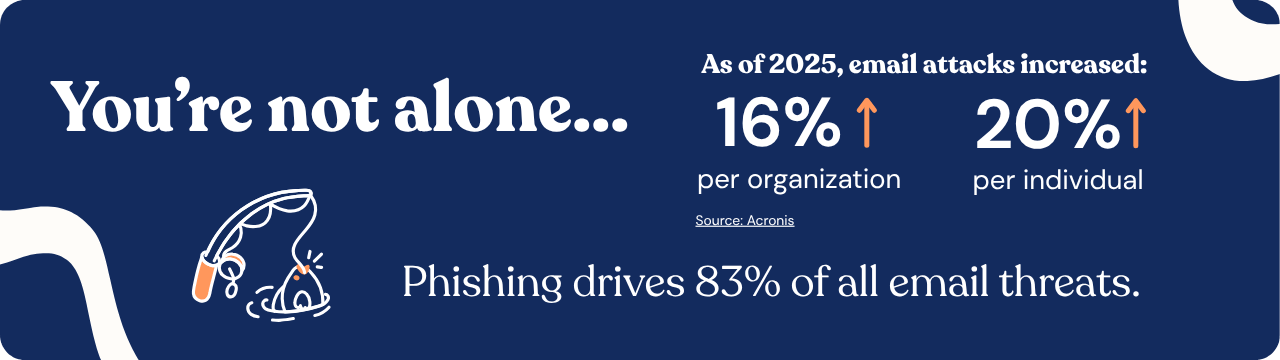
Unfortunately, cyberattacks don't usually disappear if you ignore them - so immediately absconding to Peru and living the rest of your days as a llama is not the game plan here. Fortunately, clicking a phishing email is not the catastrophe many people assume it is.
Phishing attacks work because they're designed to. Cybercriminals spend a lot of time making their emails look legitimate. They impersonate trusted brands, copy internal communications, create fake invoices, and manufacture urgency. If phishing emails only fooled careless people, they wouldn't remain one of the most successful attack methods on the planet.
The important thing isn't that you clicked. It's what you do next.
What actually happened?
Before you assume the worst, it's worth figuring out exactly what happened.
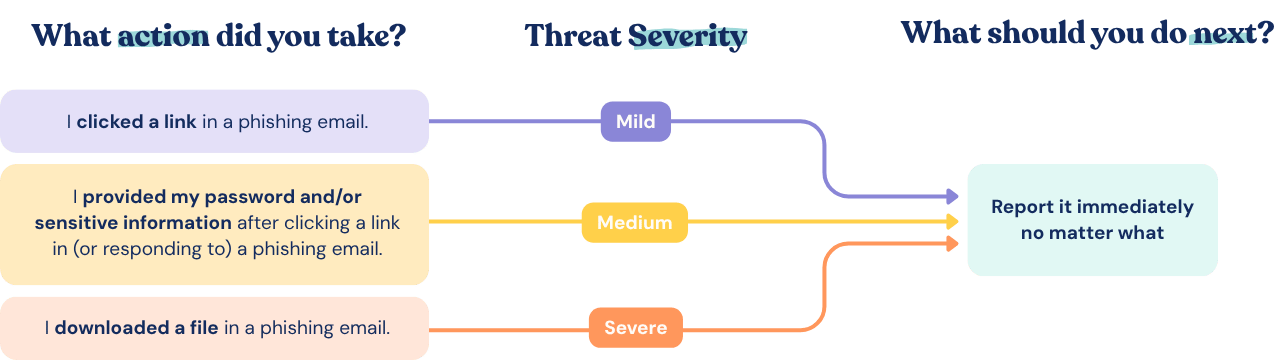
Not every phishing interaction carries the same level of risk. Opening an email is different from clicking a link. Clicking a link is different from entering your password. Downloading a file or sharing sensitive information introduces another level of concern entirely.
Think back through what happened:
- Did you only open the email?
- Did you click a link?
- Did you enter your username and password?
- Did you download a file?
- Did you open an attachment?
- Did you provide personal, financial, or company information?
The answers help determine how serious the situation might be and what actions need to happen next.
The good news is that simply opening an email is usually low risk. The risk generally increases when you interact with links, attachments, forms, or login pages. But regardless of what happened, there's one step that should always come first.
Report It Immediately
If there's one takeaway from this article, it's this: report it.
A surprising number of people hesitate after clicking a phishing email. They worry they'll look foolish. They convince themselves nothing happened. They decide to wait and see if anything goes wrong.
This is always the wrong move.
Your IT or security team would much rather investigate a potential phishing incident immediately than discover a real compromise days later. Contacting them early gives them a chance to investigate, block malicious emails, protect other users, and potentially stop an attack before it spreads.
Try to provide as much information as possible, including:
- Which email you interacted with
- Whether you clicked a link
- Whether you entered credentials
- Whether you downloaded anything
- Approximately when it happened
The faster they know, the faster they can help.
If You Only Clicked the Link
If you clicked a suspicious link but didn't enter any information or download anything, the risk may be lower than you think.
Many phishing websites are designed to steal credentials rather than infect devices automatically. That said, you should still report the incident and follow any guidance from your IT team.
Some malicious websites can attempt to exploit browser vulnerabilities or trick users into further actions, so it's always worth treating a suspicious click seriously, even if nothing obvious happened afterwards.
If You Entered Your Password
This is where speed becomes especially important.
If you entered your username and password into a website that may have been fake, assume those credentials could be compromised and take action immediately.
Start by changing the password for that account. If you've reused the same password elsewhere - and let's be honest, many people have at some point - you should change those passwords too. This is also a good time to make sure multi-factor authentication (MFA) is enabled wherever possible.
Attackers know that password reuse is common. If they successfully steal one set of credentials, they'll often try those same credentials across multiple services. That's why a single phishing email can sometimes lead to a much larger security incident.
And yes, this is the part where we put our SAT hat on and gently remind everyone that unique passwords are your friend.
If You Downloaded a File
Downloaded files deserve extra attention.
Not every attachment contains malware, but many phishing campaigns are specifically designed to trick users into downloading malicious files or installing harmful software.
If you downloaded or opened a suspicious attachment, stop interacting with it and contact your IT team right away. Follow whatever guidance they provide and run any approved security scans they recommend.
One thing you shouldn't do is attempt to solve the problem by downloading random "virus removal" tools from the internet. Turning one questionable download into three questionable downloads is unlikely to improve the situation.
Your IT team will have a process for handling potential malware incidents. Let them do their thing.
If Your Device Starts Acting Strange
Sometimes malware announces its presence in subtle ways. Sometimes it has all the subtlety of a toddler with a drum set.
If your device suddenly starts behaving differently after interacting with a suspicious email, pay attention.
Warning signs can include:
-
Unexpected pop-ups
-
Programs opening on their own
-
Significant slowdowns
-
Browser redirects
-
Unusual login prompts
-
Applications crashing unexpectedly
If something feels off, trust your instincts. Disconnect the device from the network if possible by turning off Wi-Fi or unplugging the network cable, then contact IT immediately.
Even if it turns out to be unrelated, it's better to investigate than to assume everything is fine.
Keep an Eye Out for Warning Signs
Reporting the incident isn't necessarily the end of the story.
Over the following days, keep an eye out for unusual account activity. Attackers don't always act immediately, and some signs of compromise can take time to appear.
Watch for things like:
-
Password reset emails you didn't request
-
Login notifications from unfamiliar locations
-
Messages sent from your account that you didn't write
-
Unexpected MFA prompts
-
Financial transactions or account changes you don't recognize
-
If anything seems suspicious, report it.
One of the most valuable cybersecurity skills isn't technical expertise - it's recognizing when something doesn't look right and speaking up.
Don't Let Embarrassment Make Things Worse
Let's address the elephant in the room. Many people feel embarrassed after falling for a phishing email. That's understandable. Nobody enjoys realizing they've been tricked. But phishing attacks are specifically designed to manipulate human behavior. They create urgency, exploit trust, and catch people when they're busy, distracted, or simply trying to get through their workday.
Security teams know this. In most organizations, the goal isn't to assign blame. The goal is to solve the problem. In fact, reporting a phishing incident quickly is often viewed positively because it helps protect everyone else. A prompt report can lead to malicious emails being removed from inboxes, compromised accounts being secured, and larger incidents being prevented altogether.
The click itself is often manageable. The delay in reporting it is usually what creates bigger problems.
What Can You Learn From Clicking a Phishing Email?
Once the immediate situation has been handled, it's worth taking a moment to think about why the email worked so that, hopefully, it never happens again.
What Made the Phishing Email Convincing?
Did it create a sense of urgency? Did it appear to come from someone you trust? Did it promise a reward or threaten consequences? Did it arrive at a moment when you were busy and moving quickly?
Most phishing attacks rely far more on psychology than technology. They're designed to trigger an emotional response before your critical thinking has a chance to catch up. The more familiar you become with those tactics, the easier future phishing attempts become to spot.
Think of it as cybersecurity experience points. Not the most enjoyable way to earn them, perhaps, but experience points nonetheless. Clicking a phishing email isn't a career-ending mistake. It isn't proof that you're bad with technology. You’re not the first person to fall for one, and you won’t be the last.
What matters is how you respond.
Report it quickly. Be honest about what happened. Follow your IT team's guidance. Learn from the experience and move on.
The organizations that handle phishing incidents most effectively aren't the ones where nobody ever clicks. They're the ones where employees feel comfortable raising their hand and saying, "Hey, I think I clicked something I shouldn't have."
Keep Up with New Threats
With AI making phishing emails even harder to spot, it’s a great time to brush up on what phishing actually looks like today, and what businesses should be putting in place to make sure their employees are prepared for the new age of social engineering.
Spotting a scam these days requires a whole lot more than looking for poor grammar in an email. But it still relies on the same psychological principles. Consistent phishing simulations and cybersecurity awareness training are great ways to ensure your team is ready for whatever new comes their way.