/Phin%20Logo%20Stacked.png?width=60&height=60&name=Phin%20Logo%20Stacked.png)
Open Beta means future improvements are heavily dependent on your feedback.
Check out the feedback section to learn how you can help us transform beta features into knockout features!
Overview: What Are Shared Campaigns?
Shared Campaigns is Phin's multi-tenant campaign tool built for MSPs managing security awareness training across multiple clients. Instead of setting up phishing simulations and training campaigns company by company, you create a single campaign at the partner level and enroll as many clients as you need — same content, same schedule, no repetition.
Why Use Shared Campaigns?
If you're managing ten clients or a hundred, the manual overhead of configuring campaigns individually adds up fast. Shared Campaigns is built to change that.
With Shared Campaigns you can:
- Build once, enroll anywhere — Create a campaign at the partner level and enroll new companies into it with a couple of clicks.
- Stay consistent — Every enrolled company receives the same content on the same schedule.
- Bring your own content — Upload custom training videos to your partner library and distribute them across all your clients, without re-uploading to each company individually.
- Supports custom assessment building directly in the Phin portal.
- Scale without the busywork — Onboard a new client directly into an existing shared campaign from the moment they're created.
How It Works
Shared Campaigns are created in the Campaigns section at the Partner Level. When setting up a campaign, you define:
- Content — Choose from Phin's full training catalog, apply filters to narrow content to exactly what you want, or use your own custom courses from the partner library.
- Schedule — Deliver content anywhere from once a week to once every twelve weeks, with full control over timing.
- Audience — Full company enrollment is supported, with more audience options on the way.
Once created, you can enroll companies into the campaign from the partner level overview page, or directly from within an individual company — whichever fits your workflow.
What's Supported
Campaign types:
- Continuous training campaigns
- Fixed-length training campaigns
- Onboarding training campaigns
- Continuous phishing campaigns
Content options:
- Phin's full built-in training catalog with content filters (topic, style, format, language, provider, duration) makes it easy to find exactly what you're looking for.
- Custom video courses uploaded to the partner library (up to 200MB MP4)
- Custom courses with assessments — attach a quiz to your own content so employees are tested on comprehension, not just completion (see below)
- Edit custom course content, including the assessments, and they will be updated in active campaigns automatically.
Scheduling:
- Weekly to twelve-weekly delivery cadences AKA we support weekly, monthly, quarterly training delivery and anything in between.
- Topic rotation and re-ordering across continuous campaigns
Enrollment:
- Bulk multi-company enrollment from the partner level
- Per-company enrollment from the company level
Tracked Metrics:
-
Track companies enrolled, when they enrolled, # of enrolled users per company, and each companies campaign completion rate in each shared campaigns page.
- Download these stats, including the completion rates per assigned course, per shared campaign on the shared campaigns dashboard.
- Track users enrolled and per user completion rates for each shared campaign at the company level.
- Downloading per user stats at the company level is not yet available.
Custom Content & Assessments
Partners can build training courses directly in Phin using the Partner Library course creator. Upload your own video, add a thumbnail, and now — attach an assessment with custom questions to test employee understanding after they complete the course.
Custom courses with assessments are available in Shared Campaigns, which means you can author content once and distribute it across your entire client base.
This is part of our ongoing investment in giving partners the ability to build and distribute their own branded or role-specific training content without leaving the Phin platform.
Custom Assessments Support:
- Randomization of questions
- 5 questions per assessment
- 4 answers per question / only 1 correct answer
- Optional feedback per question when incorrect answers are selected
- 100% of questions must be answered correctly to complete the course.
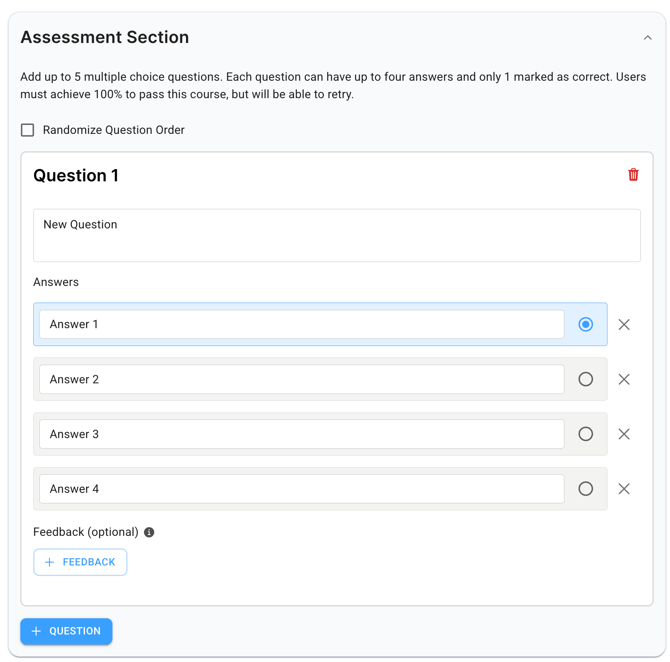
Note: Custom course assessments are supported in Shared Campaigns. Company-level campaigns do not yet support this feature.
Current Limitations
- Fixed-length phishing campaigns are not supported in Shared Campaigns.
- Downloading stats for click rates per phishing template is not available.
- Audience selection is limited to all active users (full company).
💡 Have ideas on how else we can improve Shared Campaigns?
Let us know through any of the feedback channels listed below.
Feature Improvement Relies on Your Feedback!
What else do you want Phin's campaign tools to do that they don't today? Seen something cool in another platform and wish Phin could do that? Tell us via:
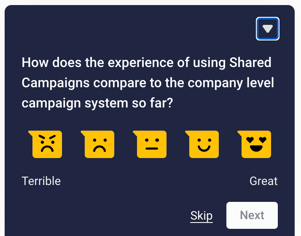
- Submitting feedback directly through our in-app survey on the Shared Campaign pages of the Phin platform (it looks like this!)
- Submit a feature request idea through our NEW feature request board.
- Sending us an email at design@phinsecurity.com where the product design team can follow up directly.
Knowledge Base
Phin works to update our Knowledge Base with new features with every release. You can read about the platform and its updates here: https://www.phinsec.io/knowledge.
Thanks for using our product!
We use all provided feedback to help drive Phin's development direction. Please keep reaching out and helping us shape the product's future! All ideas are welcome; please keep them coming!
The Product Team @ Phin
Need help or have an idea for us? Click here!